
Overview
ahaCode is a free and open source code snippets manager. It keeps your reusable code organized in a local-first desktop app with folders, tags, fragments, and AI-powered semantic search via MCP.
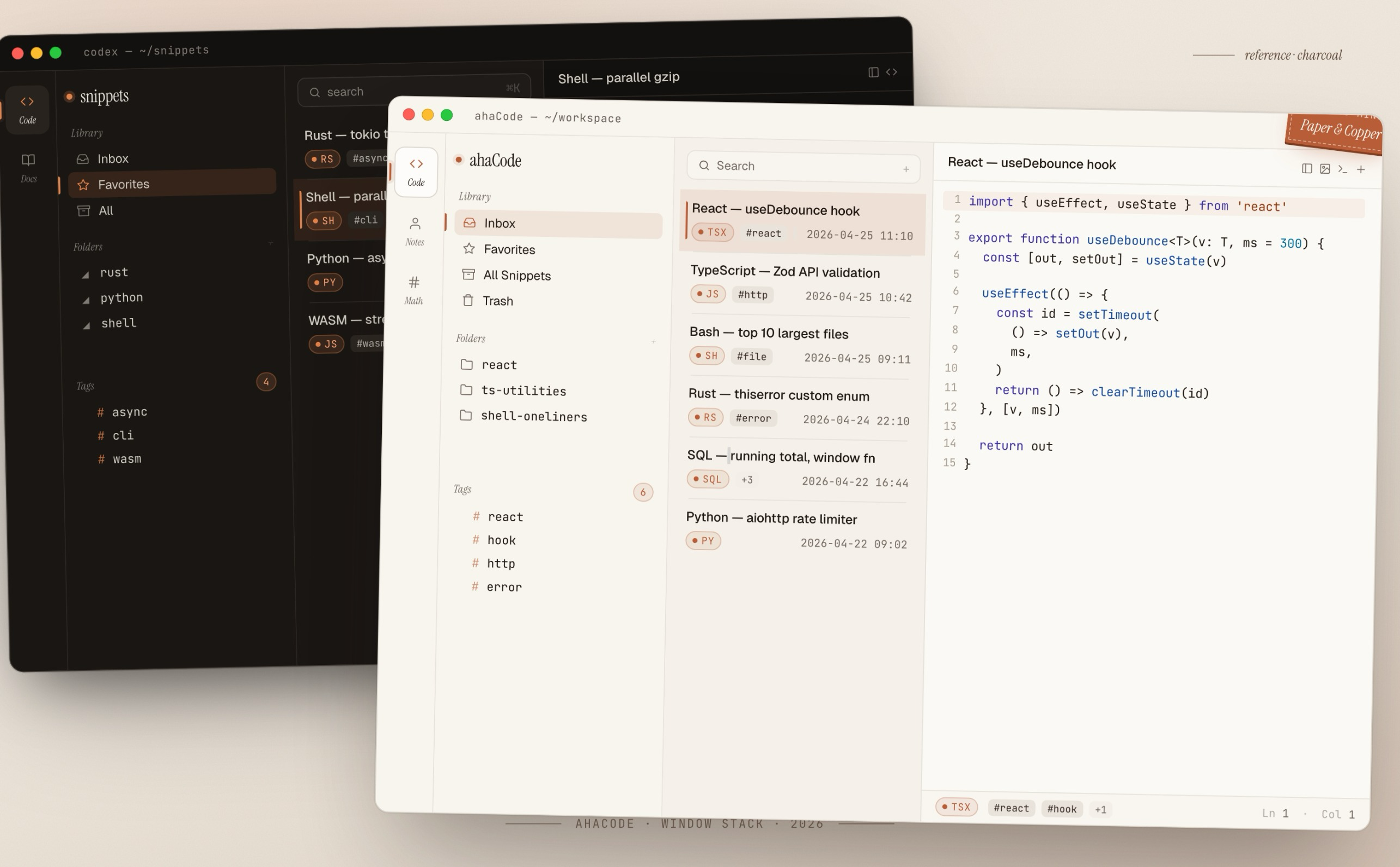
Code
Use Code to build a reusable snippet library across projects and languages. The three-column layout keeps organization, search, and editing in one place: Library on the left, snippet list in the middle, editor on the right.
AI / MCP Server
ahaCode includes a built-in MCP server that exposes your snippet library to any MCP-compatible client — Claude Desktop, Cursor, Claude Code, Zed, and more. A local embedding model powers semantic search with zero API keys required.
General Settings
Sidebar Toggle
Hide or show the Library sidebar:
- Select "View" > "Toggle Sidebar" from the menu bar or press Alt+Cmd+B on macOS or Alt+Ctrl+B on Windows or Linux.
Font Size
Adjust the editor font size:
- Cmd+= / Ctrl+= increase
- Cmd+- / Ctrl+- decrease
- Cmd+0 / Ctrl+0 reset to default
Preferences
Open the main preferences window:
- Press Cmd+, on macOS or Ctrl+, on Windows or Linux.
Compact List Mode
Code supports a compact list mode that reduces item height, so you can see more folders and snippets at once.